
Context
At Every Cure we apply machine learning to identify drug repurposing candidates: drugs that may treat diseases they weren’t originally developed for. Our pipeline integrates dozens of biomedical datasets into thousands of engineered features that help prioritize drug–disease pairs for medical review. Kedro powers these data pipelines, transforming disparate biomedical sources into a unified feature layer. As our platform evolved, we struggled to reconcile the batch-oriented workloads produced by our Kedro pipelines with the real-time needs of our application and agentic workflows.
This post is about how we closed that gap by adopting Feast.
What we had before, and why it wasn't enough
We were running two separate systems for feature access, one optimized for batch workloads and another for transactional feature access. However, neither could serve both use-cases.
For batch workloads, we had a datasets repository that versioned feature files in git: lightweight, auditable, and Kedro-friendly, but purely file-based, with no first-class entity-level view and no transactional access.
For interactive access, an "evidence store" inside our application loaded a handful of features into Postgres, allowing reviewers to filter and sort. It served real-time queries well, but lacked analytical capabilities. Data loading required manual intervention, recovery was cumbersome, and the store only understood a fixed set of entities.
This resulted in two half-answers to the same question. If a reviewer wanted every feature we had for a given drug-disease pair, there was no single place to look, and every new entity or feature type meant plumbing changes in two places.
Why Feast
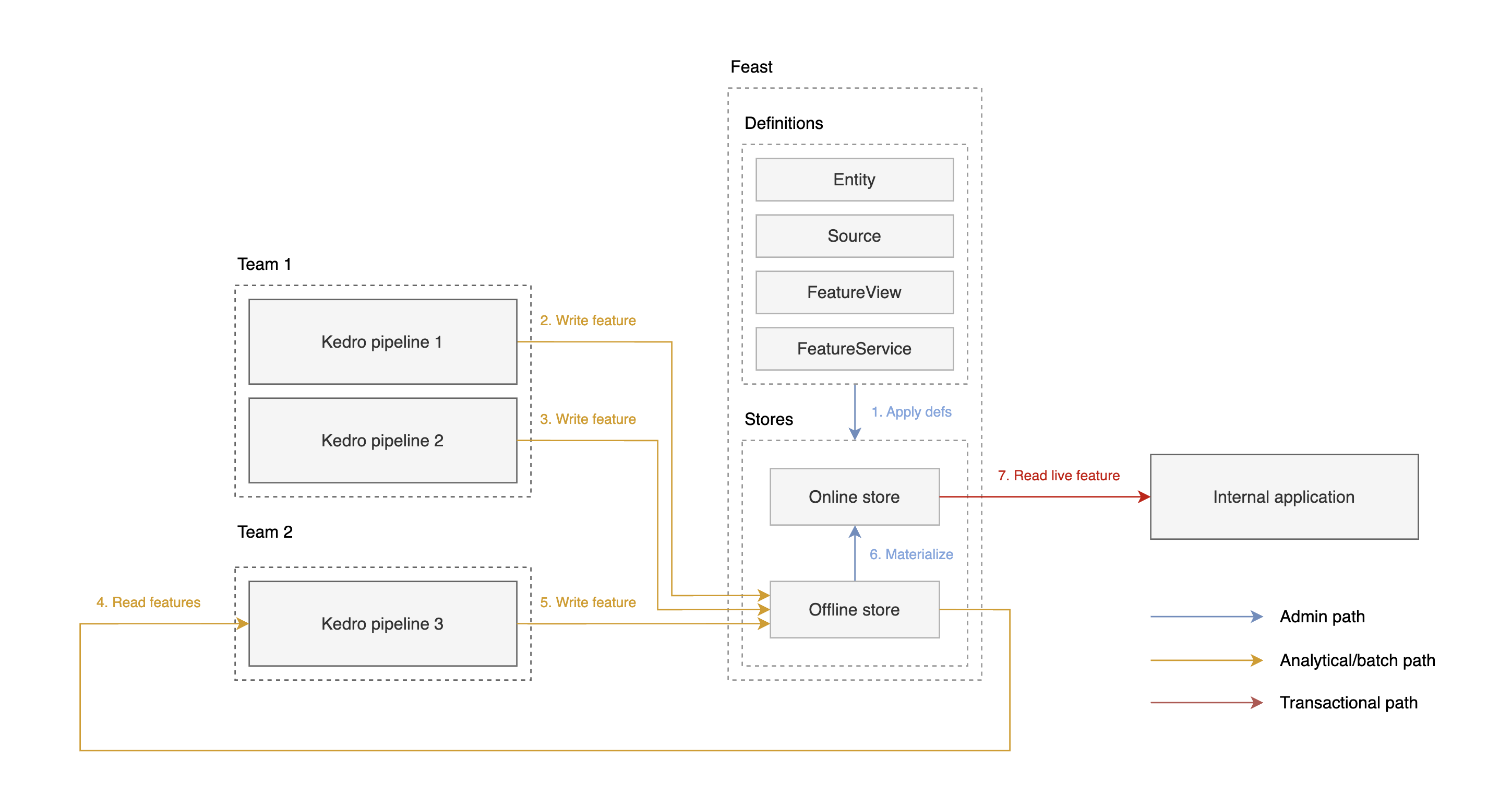
What drew us to Feast compared to other feature stores is its open-source nature, the fact it does not lock you into a cloud platform, and its relatively low operational complexity. Features are defined once centrally, and can then be consumed by any Kedro pipeline. This becomes especially valuable when multiple teams and projects produce and consume features. The registry is divided in two components, an offline store for training and analytics, and an online store for low-latency serving. Feast itself has no server component: it delegates straight into BigQuery for the offline (analytical) store and our existing Postgres for the online (serving) store.
That offline/online split is the part that unlocked the most for us. The offline store holds everything; the online store holds a curated subset, materialized on a schedule, that we can query interactively. Instead of constantly re-stitching the underlying base files to answer a question about one pair, we ask the online layer and get the latest values back in a single call.
The rest of this post walks through the feature lifecycle steps: register, write, materialize and read, and highlights the Kedro glue code we wrote in between. Together, Kedro and Feast gave us a single feature registry that supports both batch pipelines and real-time applications, enabling faster review of drug repurposing candidates and consistent access to engineered features across analytical, application, and agentic workflows.
1. Register entities and features
Entities and features are declared once in code. An entity is a domain object that features are attached to:
1# features.py
2drug = Entity(
3  name="drug",
4  join_keys=["drug_kg_node_id"],
5  value_type=ValueType.STRING
6)
7disease = Entity(
8  name="disease",
9  join_keys=["disease_kg_node_id"],
10  value_type=ValueType.STRING
11)
A source typically maps to the output of one Kedro pipeline:
1# features.py
2drug_batch_source = BigQuerySource(
3    name="drug_online_push_batch_source",
4    table="ec-features-prod.feast.drug_features",
5    timestamp_field="event_timestamp",
6)
And a FeatureView ties features to an entity and source, with typed, documented fields that Feast can validate writes against:
1# features.py
2drug_features_fv = FeatureView(
3    name="drug_feature_view",
4    entities=[drug],
5    schema=[
6        Field(
7            name="name",
8            dtype=String,
9            description="The name of the drug.",
10        ),
11        Field(
12            name="is_steroid",
13            dtype=Bool,
14            description="True when the drug is a steroid.",
15        ),
16        # ...
17    ],
18    online=True,  # expose this view to the online store
19    source=drug_batch_source,
20    enable_validation=True,
21)
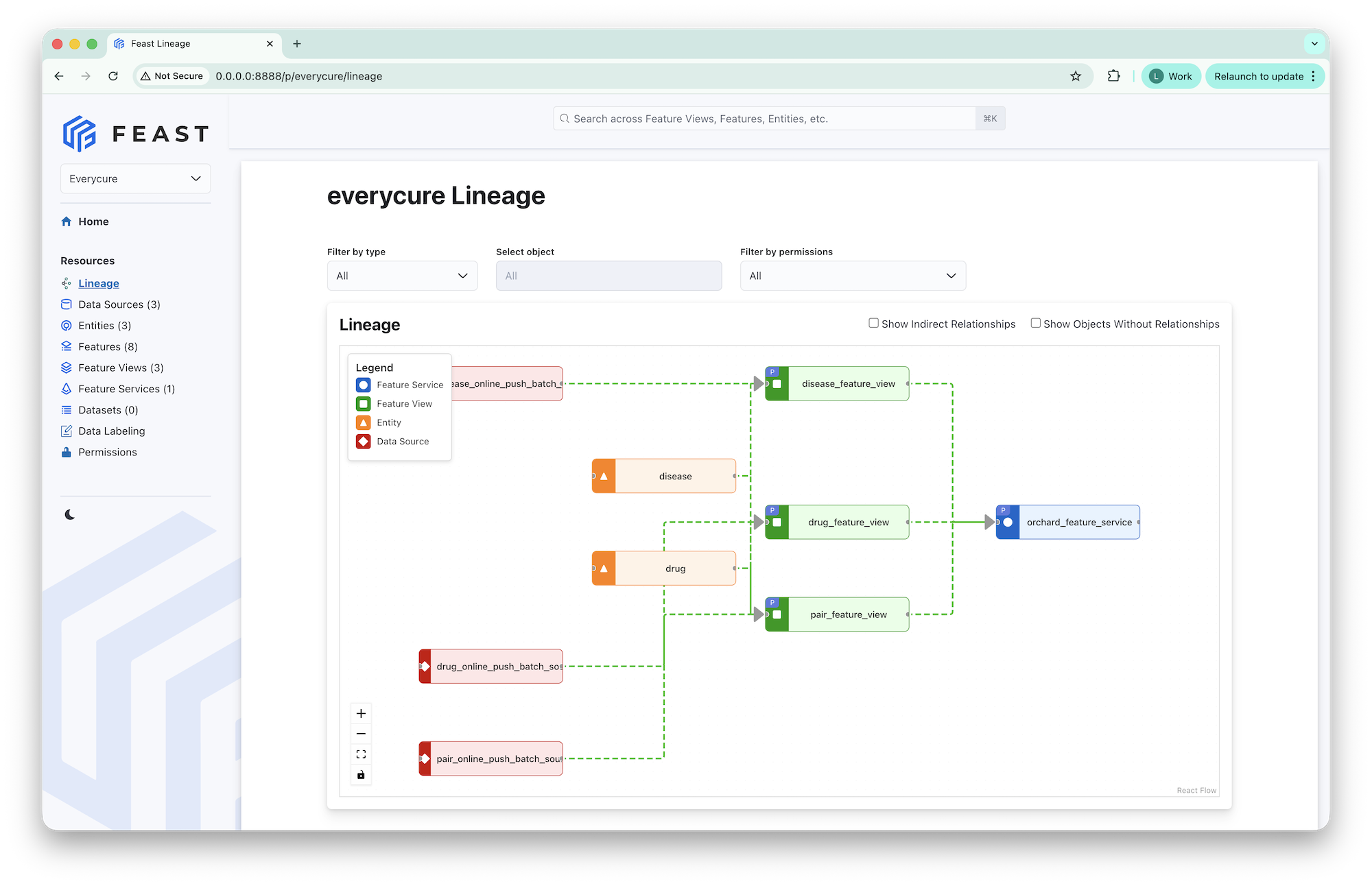
Feast also ships a UI (feast ui) for inspecting features and lineage.
2. Write features from Kedro
Since Kedro is our data pipeline framework of choice, we wrote a custom FeastDataset, allowing pipelines to write to the store through the catalog:
1#catalog.yml
2drug_features:
3  type: kedro_datasets_experimental.feast.FeastDataset
4  repo:
5    registry: path/to/registry
6    project: drug_repurposing
7    provider: local
8    offline_store:
9      type: bigquery
10      project_id: my-project
11      location: US
12  load_args:
13    # this can also point to a service to load bigger feature sets
14    feature_view_name: drug_feature_view
15  save_args:
16    feature_view_name: drug_feature_view
17    # bootstrap the BigQuery table from the feature view schema
18    create_table: true
19    # write to offline store only, handled by feast materialize
20    write_mode: offline
21
The dataset is primarily configured using the repo attribute, which serves as a pass through to the Feast sdk. Data is written using append semantics, which allows for pipelines to materialize feature values for distinct subsets of the output domain on each execution. This is especially relevant when the target domain is large and feature computation is expensive, e.g., LLMs are used to derive features for the entire drug-disease candidate space.
Reading is where the integration gets interesting. Unlike a typical dataset that retrieves data on load, this one returns a queryable handle. Thereby giving the user control over the entities, and feature set, to load for.
1# pipeline.py
2def enrich_drug_features(drug_list: pd.Dataframe, drug_feature_view):
3    """
4    Query the offline feature store for drug features.
5    Args:
6        drug_list: list of drug identifiers to get features for
7        drug_feature_view: feature view to use
8    """
9    return drug_feature_view.get_historical_features(
10        drug_list[["drug_kg_node_id"]]
11    )
12
13def create_pipeline(**kwargs) -> Pipeline:
14    return Pipeline(
15        [
16            Node(
17                func=enrich_drug_features,
18                inputs=["drug_list", "drug_features"],
19                outputs="drug_features_read",
20                name="enrich_drug_features",
21            )
22        ]
23    )
This enriches the input drug dataframe with every feature registered on the view. By default it retrieves the latest values. For reproducible experiments you pass a timestamp to get_historical_features to get a stable output result.
3. Materialize the features you want served
Feast exposes the features available online through a FeatureService, a named bundle of feature views:
1# features.py
2application_feature_service = FeatureService(
3    name="application_feature_service",
4    # add other feature views here to expose more fields
5    features=[drug_features_fv],
6    tags={"scope": "application"},
7)
This feature service is our single control point: adding a feature view to the service exposes it to reviewers in our internal application, with no other code changes. Two CLI commands keep things in sync:
1# register new entities / feature views
2feast apply
3
4# copy offline → online, incrementally
5feast materialize-incremental "$(date -u +%Y-%m-%dT%H:%M:%S)"materialize-incremental`tracks the last materialized timestamp per view, so each run only moves what changed. A nice side effect: the online store is now ephemeral, i.e., a single materialize command rebuilds it from scratch, which made our disaster-recovery story trivial.
4. Query features online
This is where our efforts pay off. Instead of stitching base files together, the app asks the online layer via get_online_features and gets the latest values back for the requested entities in a single request:
1# Online API endpoint
2if (store := settings.feature_store) is not None:
3    feature_service = store.get_feature_service("application_feature_service")
4    feature_vector = await asyncio.to_thread(
5        store.get_online_features,
6        features=feature_service,
7        full_feature_names=True,
8        entity_rows=[{
9            "drug_kg_node_id": drug_kg_node_id,
10            "disease_kg_node_id": disease_kg_node_id,
11        }],
12    )
13    raw = feature_vector.to_dict(include_event_timestamps=True)
14    # ... map raw values back onto the response, per feature view
One request fetches evolving drug, disease, and pair feature sets together. Note specifically that this removes the need to perform manual joins, wrangling, and filtering on feature files from individual teams.
Where we landed
Putting Feast behind Kedro alleviates feature management from individual, opaque datasets in the catalog to a shared, well-defined registry with explicit schemas and semantics. The registry promotes feature re-use across teams, thereby avoiding repeated re-computation of features.
This setup successfully powers both of our use-cases, i.e., analytical access is provided through BigQuery, whereas low-latency access is supported by Postgres via the online store. The state of our online store is managed exclusively by Feast and serves as the source of truth for both our internal application and agentic workflows.
Next steps
To successfully operationalize Kedro and Feast in production, a few follow-ups are required.
Publishing the registry
Feast maintains its state, the output of the apply and materialize processes, in a registry file that is used by both the online and offline stores. By default this file is stored locally. A proper production setup should manage this state remotely, e.g., in Google Cloud storage or SQL.
Automating Feast apply and materialize
Orchestrating Feast `apply` locally to roll out changes to the store will not scale well across teams. Within Every Cure we host a single monorepository, and we’ve automated the process of applying changes as part of our pull request merging process. The `materialize` command, on the other hand, is orchestrated by a daily CRON job.
Customizing the engine
By default, Feast uses a local compute engine. While this is sufficient for smaller datasets, larger workloads can benefit from a distributed compute engine such as Spark. The compute engine is responsible for, among others, executing materialization jobs.
What is Kedro?
Kedro is an open-source Python framework for structuring and authoring production-ready data and AI pipelines. It brings software engineering best practices—such as modularity, reproducibility, and separation of concerns—to help teams build maintainable, scalable workflows and transition from experimentation to production faster.
Originally developed at QuantumBlack to address the challenges of real-world data science projects, Kedro is now a project of the LF AI & Data Foundation, supported by a growing open-source community.